

Our consultants have already taken a closer look at the latest improvements to the PPMPPMSynonym for → Project Portfolio ManagementAbbreviation for Project Portfolio Management. tool and have identified the highlights for you.
1. New in Top-Down Planning
Roadmaps
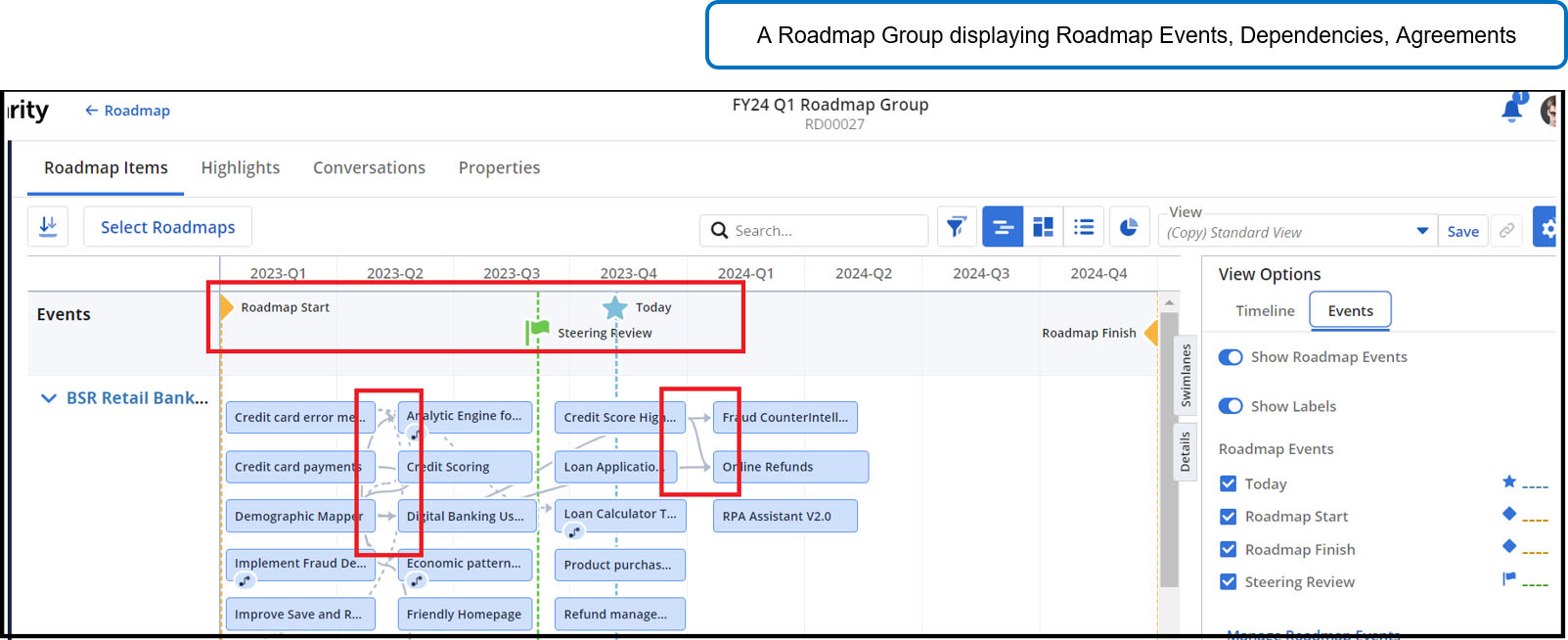
Create and manage Roadmap groups from multiple roadmapsRoadmapA roadmap is a strategic overview of projects, milestones, and objectives over a defined period of time. and gain visibility into dependencies, agreements, key milestonesMilestoneA milestone is an important checkpoint within a project that marks the completion of a key phase or deliverable., and Roadmap events.
Hierarchies
These changes within the Hierarchies module give you more possibilities when working with Clarity:
- Timeline layout to manage tasksTasksSynonym for → Action ItemAssigned piece of work across multiple investments
- Increased limit of up to 3,000 investments in a single hierarchy (except for SQL Server)
Plans in Workforce Modeling
These enhancements for Plans provide you with a better overview and an easy way to take changes to your OBS (Organizational Breakdown Structure) into account:
- New expandable tree layout to visualize parent/child relationships in the Plans workspace
- New function “Update Plan Structure from OBS” synchronizes changes from OBS
2. Transforming Investment Management
With the new Clarity release, you can now benefit from more intuitive and enhanced investment management functionality, as well as a new layout option:
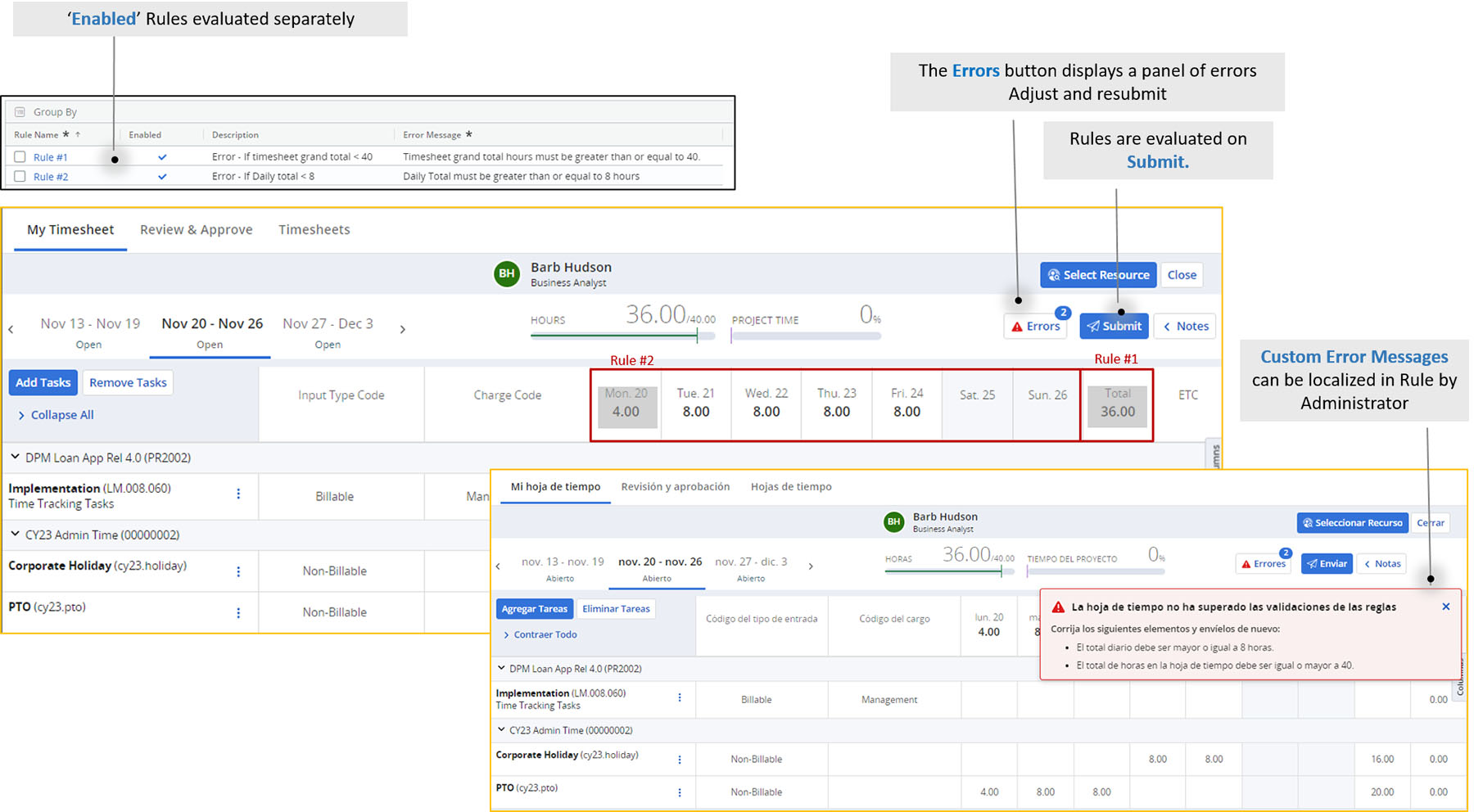
- Timesheet validation rules introduced (BETA)
- Copy tasksTasksSynonym for → Action ItemAssigned piece of work within an investment using a mouse right-click action
- Timeline layout added to the Tasks workspace
3. Reinventing Resource Management
Resource planningResource PlanningResource planning describes the planning and allocation of human and material resources across projects. with Clarity becomes even more efficient thanks to optimized and expanded display options for key figures, among other things.
- Resource object supports processes and workflows
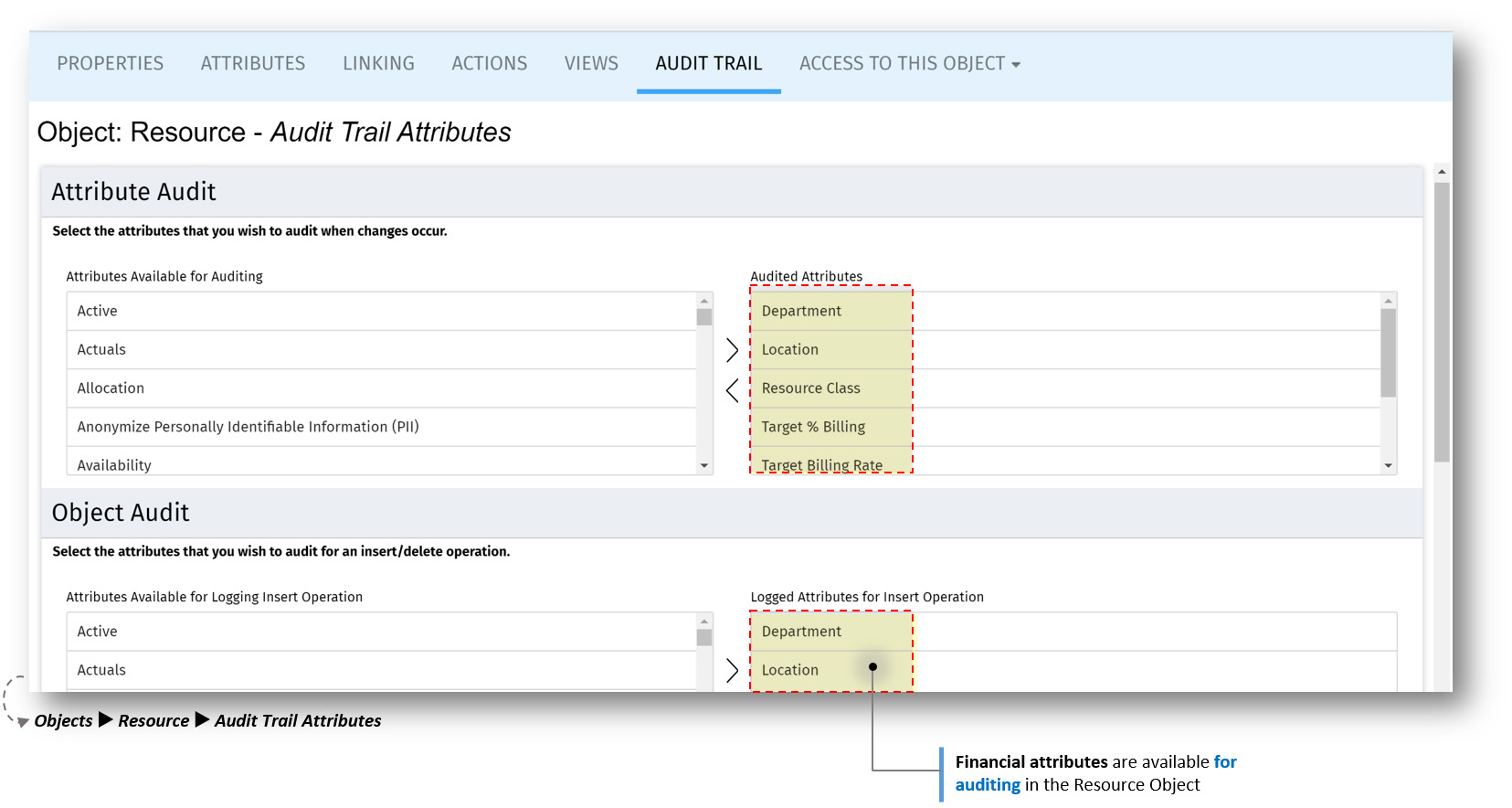
- Financial attributes (view only) on the Resource object
Audit Capabilities (Audit Trail)
- The configured unit of measure is displayed for old and new values: assignmentAssignmentAssignment describes the organizational or structural allocation of resources, tasks or projects. ETC (Estimate to Complete), assignment actuals, and RoadmapRoadmapA roadmap is a strategic overview of projects, milestones, and objectives over a defined period of time. item capacityCapacitySynonym for → AvailabilityGeneral term for available work capacity.
- Per-period metrics on the assignment object: ETC, actuals, ETC cost, and actual cost
4. Optimizing My Workspace and Mobile App
Checklists
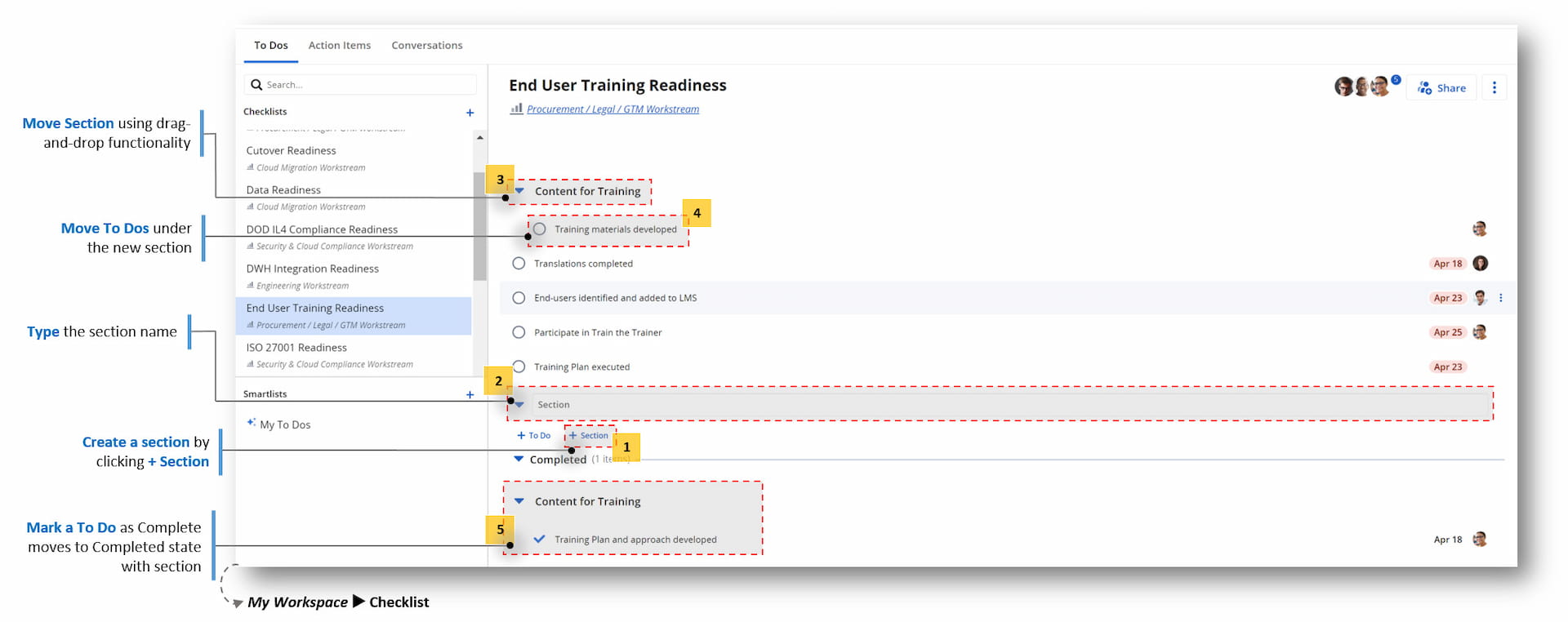
Create and maintain sections within checklists to provide structure and overview for upcoming items.
Mobile App
New features for timesheets, administration, and “My Workspace” provide an enhanced user experience for the mobile app:
- Access “My Workspace” Smartlists via the app (view only)
- New function to “Add TasksTasksSynonym for → Action ItemAssigned piece of work” to a timesheet
- Enter a timesheet note date
- Manage the Clarity mobile application with MS Intune (BETA)
5. Improvements from the Customer Voice
Once again, users actively used Broadcom’s open ear to make suggestions for improvements. These new functions and features are the result of the Customer Voice:
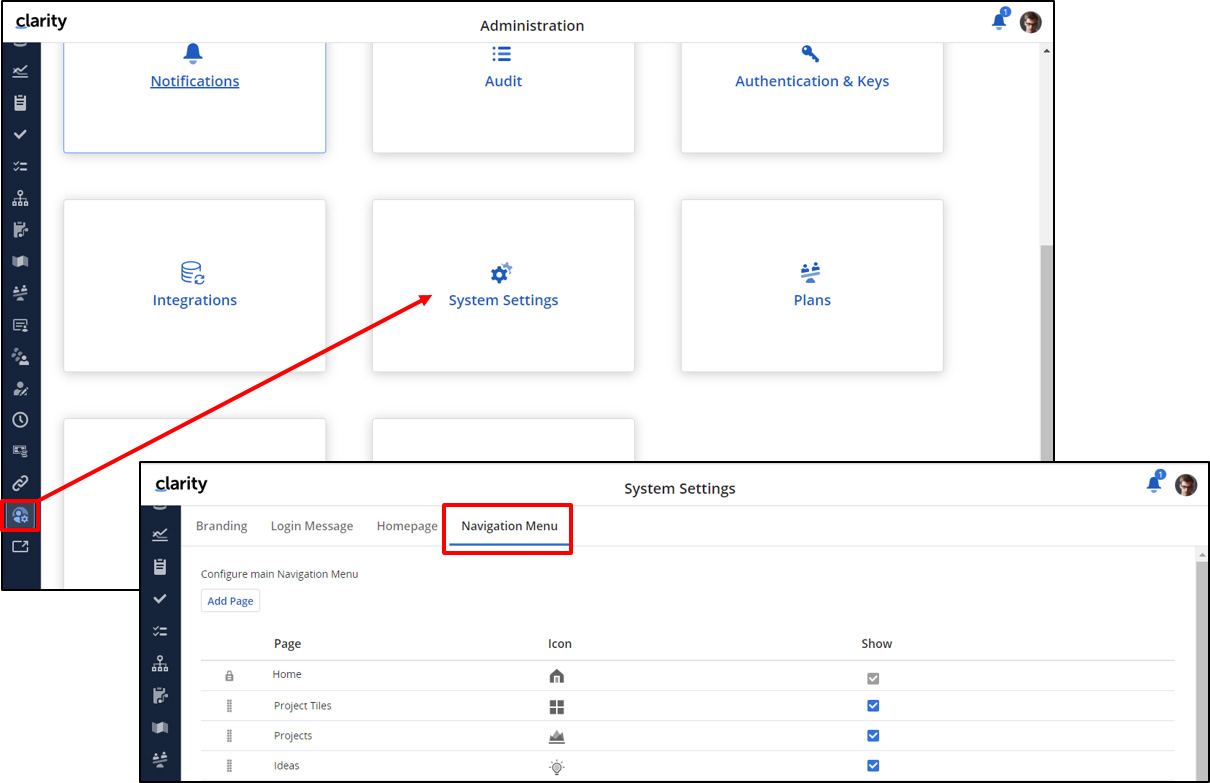
Main Navigation Menu Improvements
- Promote Custom Investments, Team Investments, Custom Objects, and Pages to the menu
- Reorder and hide menu items
- Assign or change menu icons selected from an icon library
Further Improvements
- Configure channels directing users to the Modern UX
- Configure Investment attribute labels and tooltips uniquely for each Investment type
- Display “Today” in the Investment TaskTaskSynonym for → Action ItemAssigned piece of work timeline
- Horizontal and vertical display options for bar chart widgets
- CSV import supports ProjectsProjectA project is a temporary initiative with clearly defined objectives, resources, and a specific outcome., Custom Investments, Ideas, and Team Investments
Additional Information
Get Your Upgrade Now!
As the largest Brodacom partner in Europe, we would be happy to give you a personal demonstration of the features of new Clarity release as they relate to your specific application and provide you with the latest version.

Read Next


Breaking Down What’s New in Clarity Release 16.3.3
With the latest Clarity version, you gain enhanced reporting, automated processes, and new ways to plan and manage investments with confidence.
Clarity Release 16.4.0: These Features Will Move You Forward!
More efficient processes thanks to AI agents, improved data analysis through reporting enhancements, and many other highlights await you in Clarity release 16.4.0.